
Knowledge Base · Hosting Setup Guides
How to Claim Your Free .co.ke Domain With a Yearly Business, Corporate or Enterprise Plan
Yearly Business, Corporate and Enterprise plans come with a free .co.ke domain for the first year. Claim it during checkout and your domain, website and email are connected automatically — no DNS settings to touch.
Which plans include a free .co.ke?
| Plan | Yearly price | Free .co.ke |
|---|---|---|
| Starter | KES 1,699/year | ❌ — register separately from KES 1,199/year |
| Business | KES 3,999/year | ✅ |
| Corporate | KES 5,999/year | ✅ |
| Enterprise | KES 7,999/year | ✅ |
| Monthly plans (from KES 169/month) | Monthly | ❌ — register separately from KES 1,199/year |
| Free plan | KES 0 | ❌ |
Prices exclude 16% VAT. The free domain must be ordered together with a yearly Business, Corporate or Enterprise plan.
Step 1: Pick a good .co.ke name
Before ordering, spend two minutes on the name — it goes on your business cards, signboards and email for years.
- Short and easy to spell over the phone.
mamambogafarm.co.kebeatsmama-mboga-fresh-farm-produce.co.ke. - Avoid numbers and hyphens unless they are part of your brand.
- Match your registered business name where possible — customers search for it.
- If your name is taken, try adding your town or trade:
yourbusiness-nairobi.co.ke,yourbusinessltd.co.ke,yourbusinessagencies.co.ke.
.co.ke is for companies and individuals doing business. NGOs use .or.ke, schools .sc.ke, and universities .ac.ke — these have extra document requirements. See Register a .co.ke domain.
Step 2: Choose a yearly plan
On Shared Hosting, make sure Yearly is selected and click Select on your plan. (Not sure which? Use the Help me choose quiz on the plans page.)
Step 3: Search for and claim the domain
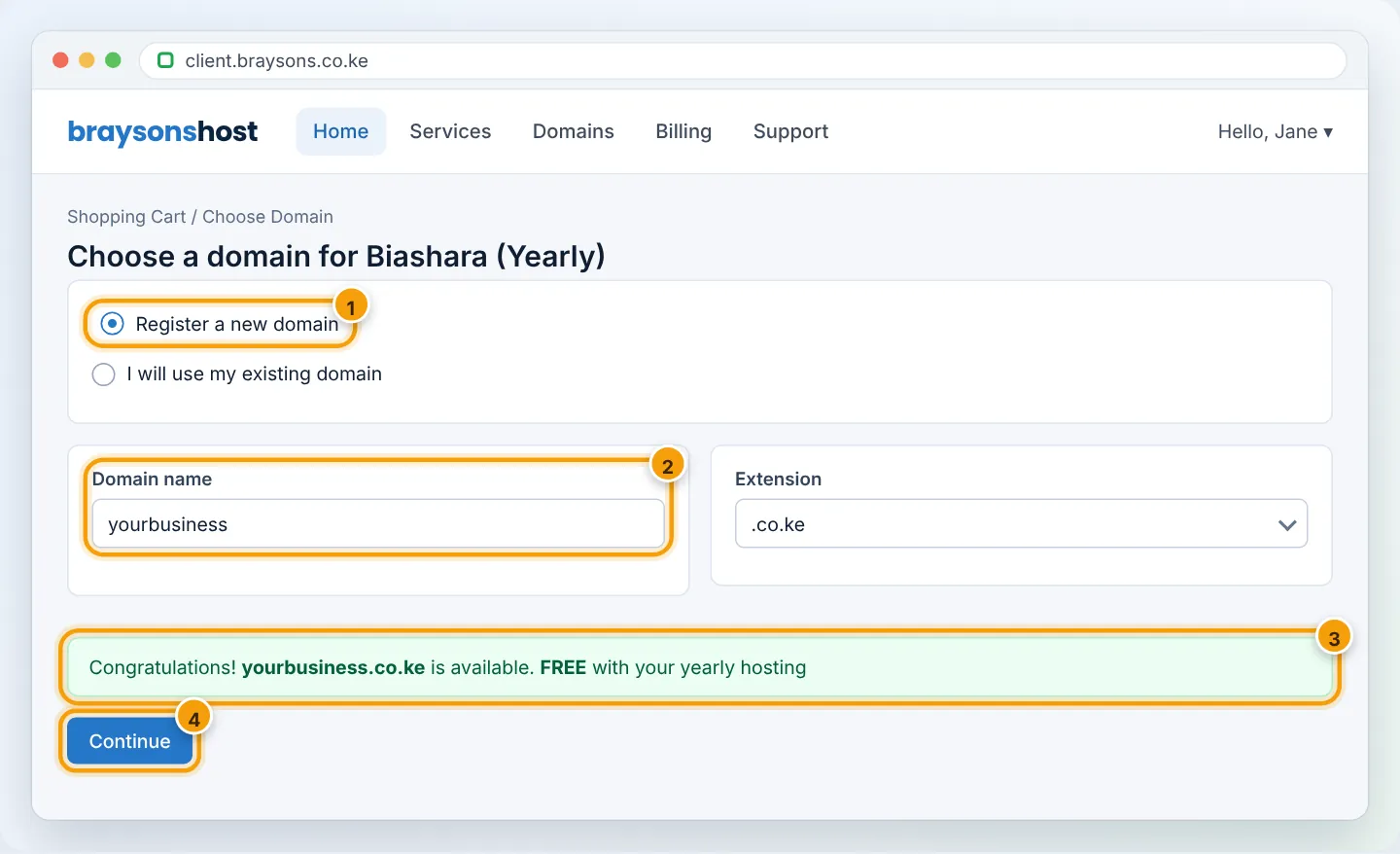
On the domain step of the order, choose Register a new domain, type your name, keep .co.ke selected and click Check.
- Available — click Add to cart. The domain line shows KES 0.00 — Free with hosting.
- Taken — pick one of the suggestions or try another name.
Step 4: Review the cart
The order summary should show:
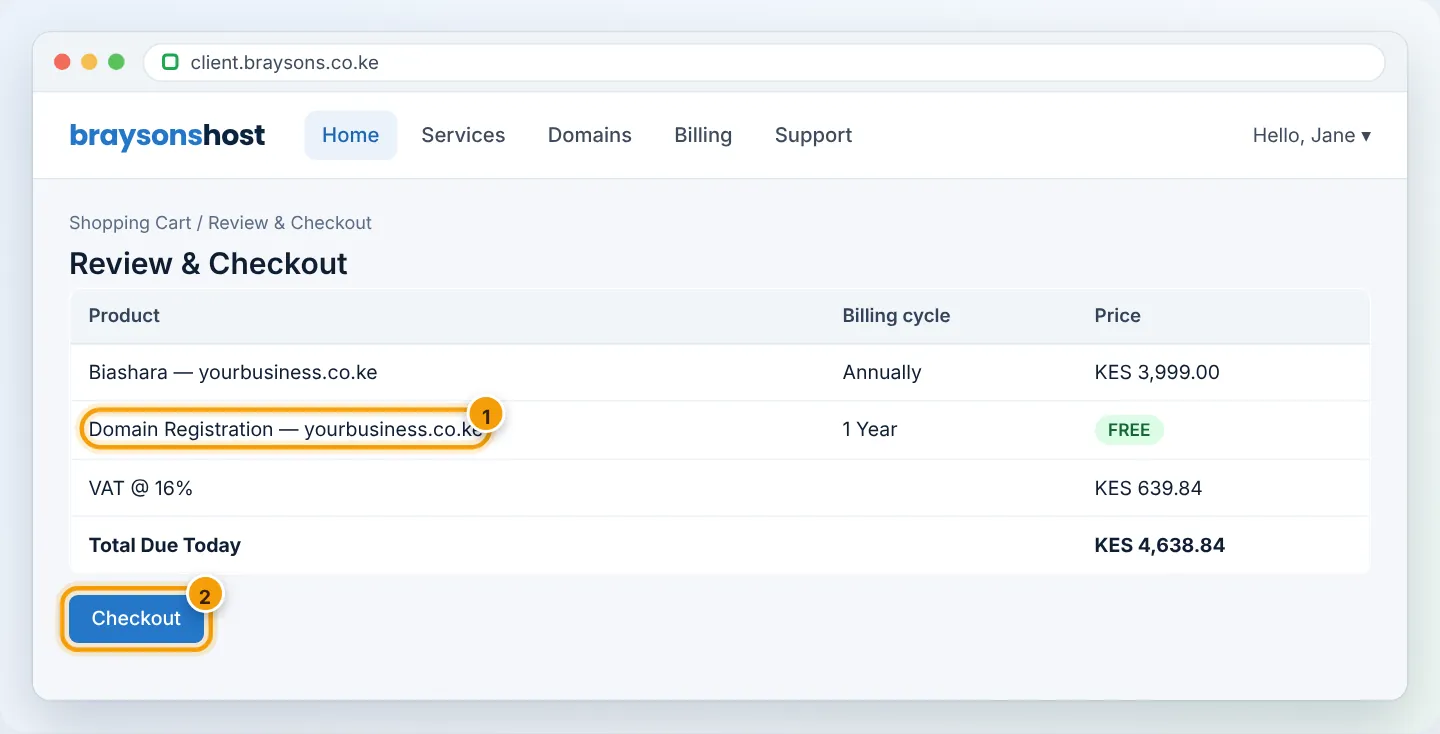
If the domain is charged, check that the hosting is Business, Corporate or Enterprise on Annually — Starter and monthly billing do not include the free domain.
Step 5: Enter registrant details and pay
KeNIC, the .ke registry, requires accurate owner (registrant) details: full name or company name, a working email, a Kenyan phone number and a physical/postal address. Use the business owner’s details, not your web designer’s — the registrant is the legal owner of the domain.
Pay with M-Pesa (STK prompt on your phone), card or another listed method. See Pay your invoice with M-Pesa.
Step 6: Wait a few minutes — everything is connected for you
After payment:
- The domain is registered with KeNIC (usually within 15 minutes).
- Your hosting account is created with the domain already attached.
- Nameservers are set to
ns1.asushost.camandns2.asushost.camautomatically. - Free SSL is issued within about an hour.
You receive the New Account Information and domain registration emails. Log in to cPanel and start building — see How to log into cPanel.
Keeping the domain after year one
The domain is included free for the first year with your yearly plan. Before it expires you receive renewal reminders by email and WhatsApp. To avoid any risk of losing it:
- Turn on Auto Renew for the domain in Domains → My Domains → Manage.
- Keep a payment method saved — see Add a payment method.
- Keep your contact email current so reminders reach you.
Details: Renew your domain before it expires.
Troubleshooting
| Problem | Cause | Fix |
|---|---|---|
| Domain shows a price instead of FREE | Monthly billing selected, or domain added separately | Change hosting to Annually and add the domain on the plan’s domain step |
| “Domain unavailable” | Already registered by someone else | Try variations; check whois to see when it expires |
| Registration pending more than 24 hours | Registrant details incomplete | Check your email for a request from us; complete details in Domains → My Domains → Contact Information |
| Site shows our default page | Nothing uploaded yet | Upload your website or install WordPress |
Frequently asked questions
Who owns the free domain?
You do — the registrant named at checkout. You can transfer it to another registrar later if you choose.
Can I choose a .com instead?
The free domain offer applies to .co.ke. Other extensions can be added at their normal price — see Domain Pricing.
I already registered my .co.ke elsewhere. Can I still use the plan?
Yes — choose I will use my existing domain and point it to us. Or transfer it to AutoHost to manage everything in one place.
Figures are simplified illustrations. Your screen may look slightly different depending on your theme and the version of cPanel or the app you use.
Still need help?
Our Kenyan support team is on WhatsApp — real people, not bots. Mon–Sat, 8am–10pm EAT. Tickets are open 24/7.