
Knowledge Base · Hosting Setup Guides
How to Create a Subdomain (shop.yourbusiness.co.ke)
A subdomain is a separate website that sits under your main domain — for example shop.yourbusiness.co.ke for an online store or portal.yourbusiness.co.ke for a client login. It costs nothing extra and does not need a new domain registration.
In current versions of cPanel, subdomains and addon domains are both created from one place: Domains → Domains → Create A New Domain. (Older guides mention a separate Subdomains icon; it no longer exists on our servers.)
Subdomain limits per plan: Starter 50, Business 100, Corporate 150, Enterprise 250 (Free plan: 5).
Good uses for subdomains
| Subdomain | Typical use |
|---|---|
shop.yourbusiness.co.ke |
A WooCommerce store kept separate from the main site |
blog.yourbusiness.co.ke |
A WordPress blog next to a hand-coded company site |
portal.yourbusiness.co.ke |
Client or staff login area |
staging.yourbusiness.co.ke |
A private copy for testing changes (see Staging sites) |
school.yourbusiness.co.ke |
A department, branch or campaign with its own design |
Step 1: Open Domains
In cPanel, go to Domains → Domains and click Create A New Domain.

Step 2: Enter the subdomain
- In Domain, type the full subdomain, e.g.
shop.yourbusiness.co.ke. - Leave Share document root unticked — this gives the subdomain its own folder so its files do not mix with your main website.
- Document Root fills itself in (for example
shop.yourbusiness.co.keinside your home folder). You can change it, but the default is fine. - Click Submit.
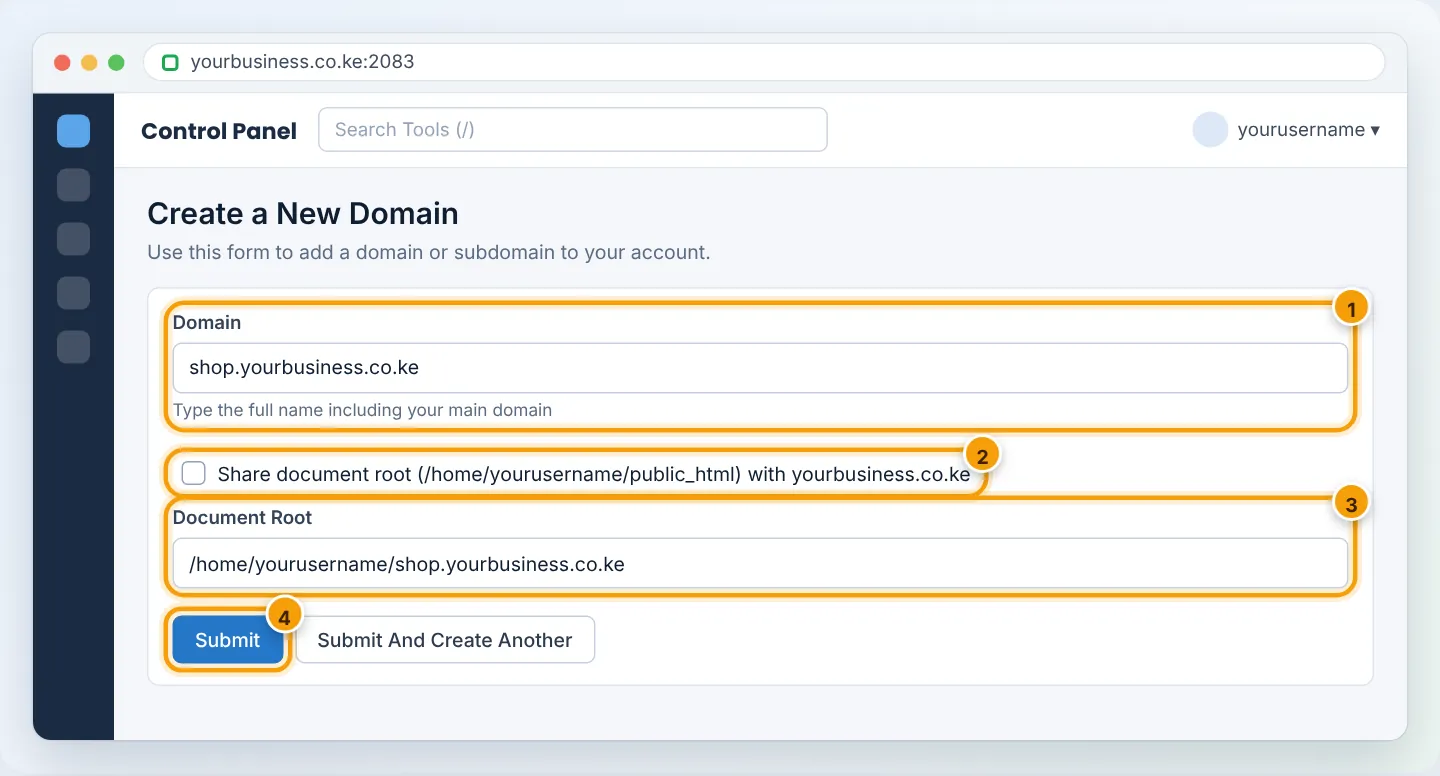
You will see “Success: You have successfully created the new domain.” The DNS record for the subdomain is created automatically on our nameservers.
Step 3: Secure it with SSL
Go to Security → SSL/TLS Status, tick the new subdomain and click Run AutoSSL. After a few minutes it shows a green padlock. Then turn on Force HTTPS Redirect for it in Domains → Domains. Full details: Install your free SSL certificate.
Step 4: Put a website on it
Choose one:
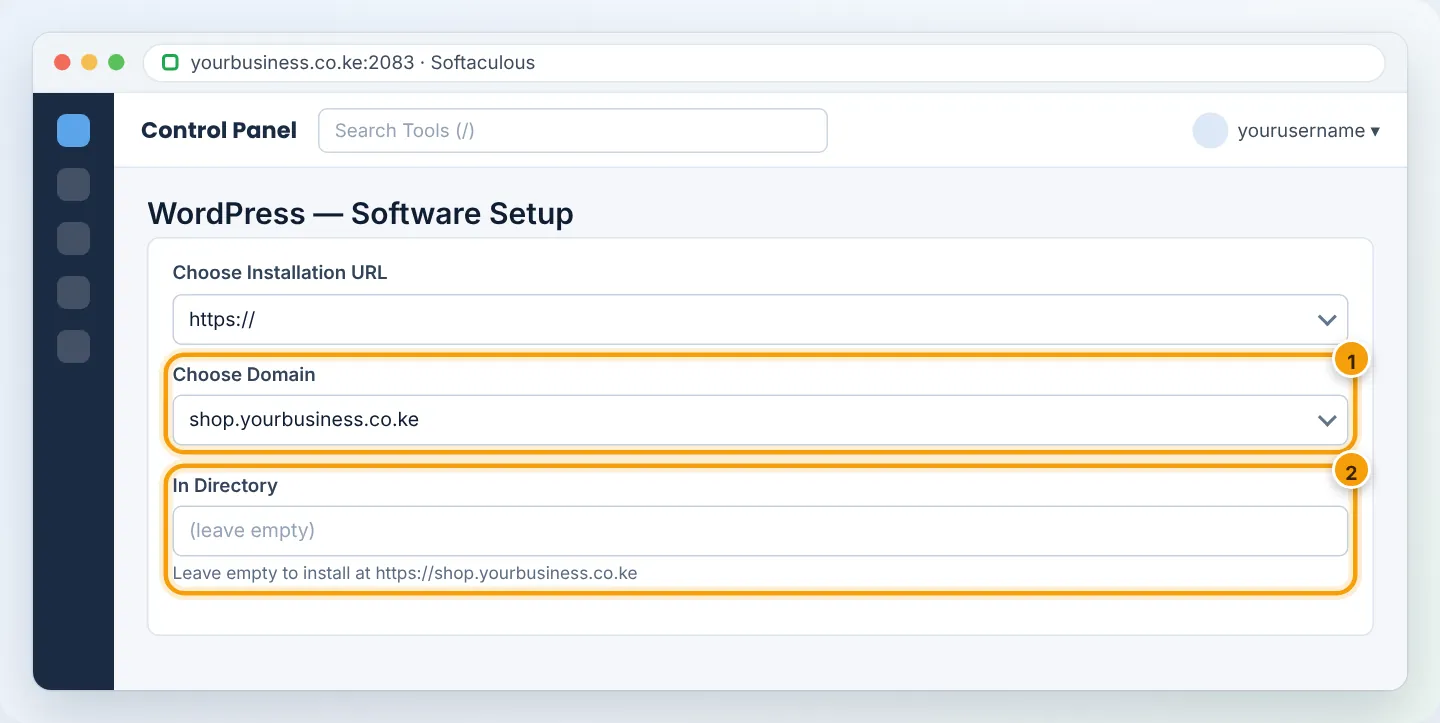
- Upload files — open File Manager, go into the subdomain’s folder (for example
/shop.yourbusiness.co.ke) and upload as described in Upload your website files. - Install WordPress — in Softaculous, choose the subdomain in the Choose Domain box and leave In Directory empty.
Step 5: Test
Visit https://shop.yourbusiness.co.ke. You should see your new site (or the WordPress welcome page). If you see your main site instead, the subdomain is sharing the main document root — edit it in Domains → Domains → Manage and set its own folder.
Pointing a subdomain to an outside service
Sometimes a subdomain should open a service hosted elsewhere — for example shop. pointing to Shopify, or mail. to Google Workspace. In that case do not create it under Domains; instead add a DNS record in Domains → Zone Editor:
| Service asks for | Record to add |
|---|---|
| “Point a CNAME to shops.myshopify.com” | CNAME — Name shop, Record shops.myshopify.com |
| “Point an A record to 203.0.113.10” | A — Name shop, Address 203.0.113.10 |
See Managing DNS records.
Troubleshooting
| Problem | Cause | Fix |
|---|---|---|
| “The domain already exists” | Subdomain was added before, or exists as a DNS record | Check Domains list and Zone Editor; remove the duplicate first |
| Subdomain shows the main website | Created with Share document root ticked | Manage the subdomain and give it its own document root |
| “This site can’t be reached” | DNS managed outside AutoHost (e.g. Cloudflare) | Add an A record for the subdomain at your DNS provider |
| SSL error on the subdomain | Certificate not issued yet | Run AutoSSL and wait 5 minutes |
Frequently asked questions
Does a subdomain need a separate hosting plan?
No. It uses your existing plan’s storage and limits.
Can a subdomain have its own email addresses?
Yes — for example jane@shop.yourbusiness.co.ke. Choose the subdomain in the Domain box when creating the account. Most businesses keep email on the main domain for simplicity.
Is a subdomain good for SEO?
Search engines treat subdomains as related but separate sites. For a blog meant to boost your main site’s ranking, a folder (yourbusiness.co.ke/blog) is usually better.
Figures are simplified illustrations. Your screen may look slightly different depending on your theme and the version of cPanel or the app you use.
Still need help?
Our Kenyan support team is on WhatsApp — real people, not bots. Mon–Sat, 8am–10pm EAT. Tickets are open 24/7.