
Knowledge Base · Domain Management
How to Redirect a Domain or Page (301 Redirects)
Redirects send visitors (and Google) from one address to another automatically. Use them when you rebrand, change a page's URL, own several domains, or want www and non-www to behave the same. Done right, you keep your search rankings.
301 or 302?
| Type | Means | Use for | SEO |
|---|---|---|---|
| 301 — Permanent | “This has moved for good” | Rebrands, new domain, renamed pages, extra domains | Passes ranking value to the new address ✅ |
| 302 — Temporary | “Back soon” | Short promotions, maintenance pages | Google keeps the old address indexed |
When in doubt, use 301.
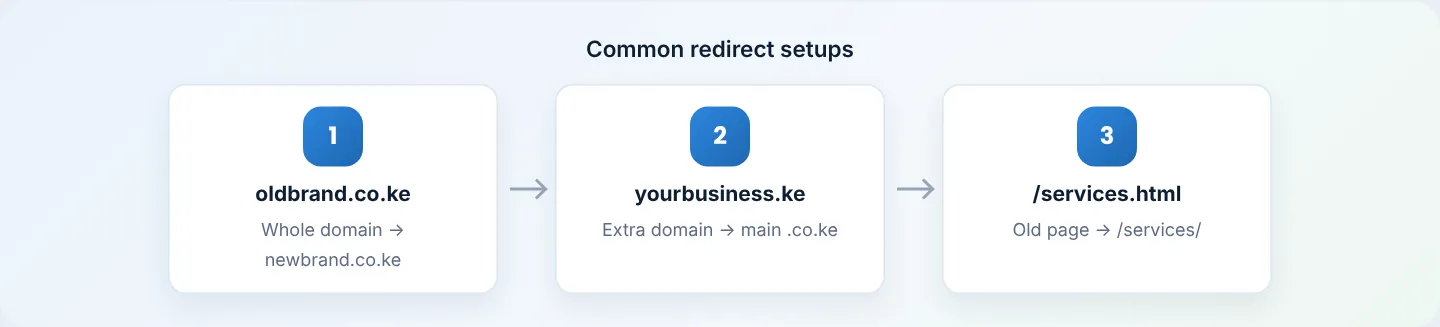
Before you start
- The domain you are redirecting from must be on your hosting account (as the main domain, an addon domain, or added under Domains → Domains) and point to our nameservers.
- If the old domain has its own website that should disappear, back it up first.
Method 1: cPanel Redirects
Step 1: Open Redirects
In cPanel, go to Domains → Redirects.
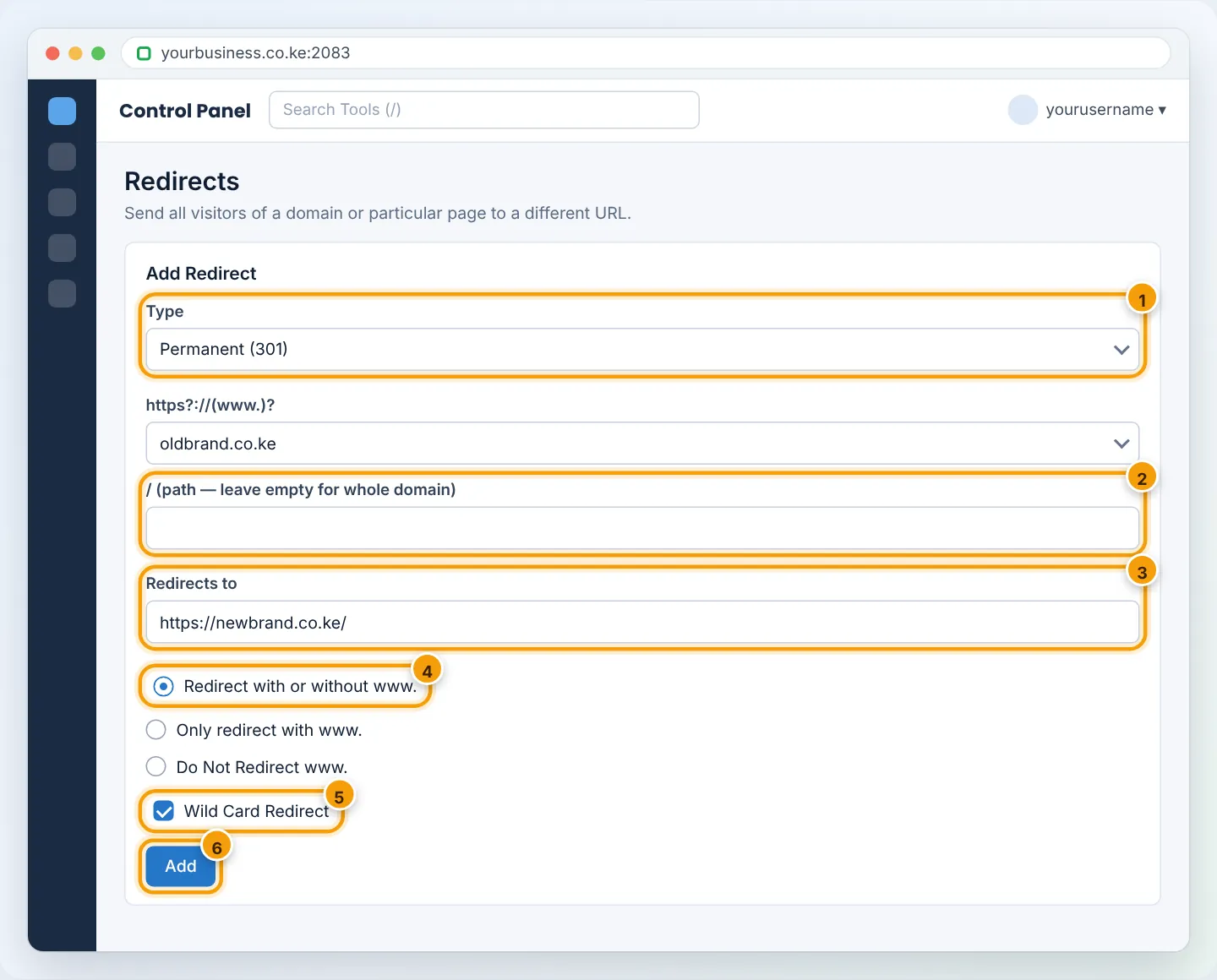
Step 2: Fill in the redirect
- Type: Permanent (301).
- https?://(www.)? — choose the domain to redirect from (or ALL Public Domains).
- Path after the
/: leave empty to redirect the whole domain, or type a page path likeold-page.html. - Redirects to: the full destination, e.g.
https://newbrand.co.ke/. - www. redirection: Redirect with or without www. (recommended).
- Wild Card Redirect: tick it so
oldbrand.co.ke/aboutgoes tonewbrand.co.ke/about(same path on the new domain). Leave it unticked to send everything to the homepage. - Click Add.
Step 3: Test
Open the old address in a private window — it should jump to the new one. To confirm it is a 301, use httpstatus.io or redirect-checker.org: the result should show 301 Moved Permanently.
Method 2: .htaccess (more control)
Edit .htaccess in the old site’s folder with File Manager (Settings → Show Hidden Files to see it). Add rules at the top:
Redirect one page:
Redirect 301 /old-page.html https://yourbusiness.co.ke/new-page/
Redirect a whole domain, keeping the path:
RewriteEngine On
RewriteCond %{HTTP_HOST} ^(www.)?oldbrand.co.ke$ [NC]
RewriteRule ^(.*)$ https://newbrand.co.ke/$1 [R=301,L]
Always use the non-www version of your own domain:
RewriteEngine On
RewriteCond %{HTTP_HOST} ^www.yourbusiness.co.ke$ [NC]
RewriteRule ^(.*)$ https://yourbusiness.co.ke/$1 [R=301,L]
Do not combine cPanel’s Force HTTPS Redirect, cPanel Redirects and your own .htaccess rules for the same thing — conflicting rules cause an endless loop. If you see “too many redirects”, see Fix too many redirects.
WordPress sites
For individual pages inside WordPress, the free Redirection plugin is easiest: Tools → Redirection → Add new (source URL → target URL, 301). It also logs 404 errors so you can catch broken links.
Keep your rankings after a rebrand
- Redirect every old page to its matching new page (wildcard), not just to the homepage.
- Keep the old domain registered and redirecting for at least a year.
- In Google Search Console, add the new domain and use Change of Address.
- Update links on your social profiles, Google Business Profile and email signatures.
Removing a redirect
In Domains → Redirects, scroll to Current Redirects and click Delete. Browsers cache 301s, so test in a private window.
Troubleshooting
| Problem | Cause | Fix |
|---|---|---|
| Redirect not happening | Old domain not on this account, or DNS points elsewhere | Add the domain under Domains and point it to us |
| “Too many redirects” | Destination redirects back to the source | Check both sides; remove the conflicting rule |
| Goes to homepage instead of same page | Wild Card Redirect not ticked | Delete and recreate with Wild Card |
| Still redirecting after deleting | Browser cached the 301 | Clear cache or test in private mode |
Frequently asked questions
Can I redirect a domain registered elsewhere?
Yes — point its nameservers to AutoHost, add it under Domains, then redirect.
Does a redirect affect email on that domain?
No. Email follows MX records, not web redirects.
Figures are simplified illustrations. Your screen may look slightly different depending on your theme and the version of cPanel or the app you use.
Still need help?
Our Kenyan support team is on WhatsApp — real people, not bots. Mon–Sat, 8am–10pm EAT. Tickets are open 24/7.