
Knowledge Base · Domain Management
How to Forward Emails From Your Domain to Gmail or Another Inbox
A forwarder sends a copy of every email that arrives at one address to another address — for example info@yourbusiness.co.ke straight to your Gmail, or sales@ to three salespeople. No mailbox to check, no app to set up.
Forwarder or mailbox?
| Forwarder | Full mailbox | |
|---|---|---|
| Receive emails at your domain | ✅ | ✅ |
| Reply as info@yourbusiness.co.ke | ❌ (replies come from your Gmail) — unless you add Gmail “Send mail as” | ✅ |
| Uses storage on your hosting | ❌ | ✅ |
| Works with no extra setup | ✅ | Needs app or webmail |
| Good for | Solo owners, distributing mail to a team | Staff who send business email |
Many businesses use both: a mailbox for sending, plus a forwarder to copy everything to a manager.

Step 1: Open Forwarders
In cPanel, go to Email → Forwarders and click Add Forwarder.
Step 2: Create the forwarder
- Address to Forward: type the part before the @ (e.g.
info) and choose the domain. - Destination: select Forward to Email Address and type the destination (e.g.
you@gmail.com). - Click Add Forwarder.
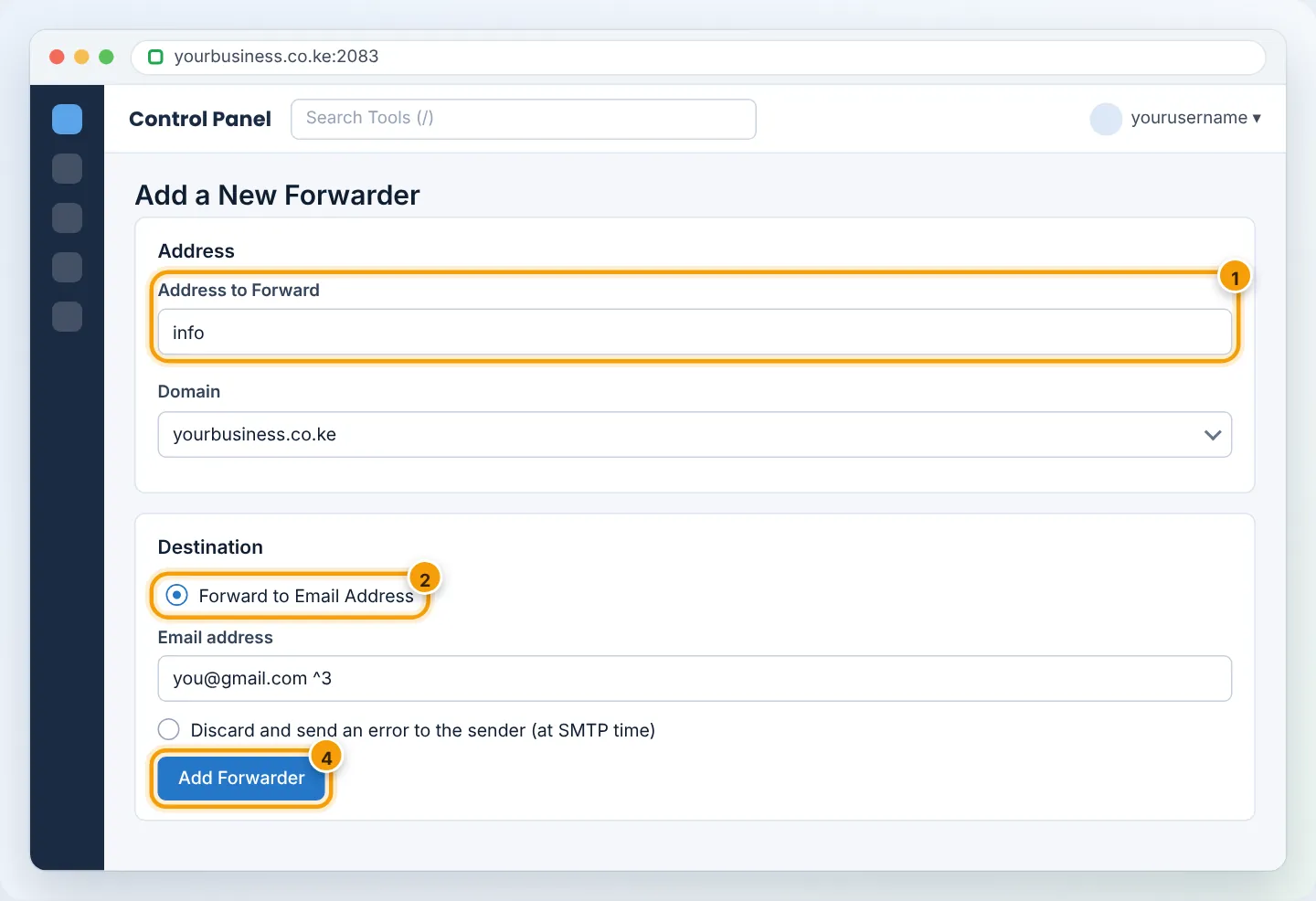
To send one address to several people, create the same forwarder again with a different destination each time (e.g. sales@ → Jane, sales@ → Peter).
Step 3: Test it
From a different email account (not the destination itself), send a message to info@yourbusiness.co.ke. It should arrive at the destination within a minute or two. Check spam/promotions on the first try.
Gmail sometimes hides an email you sent to yourself. Always test from a third account, such as a colleague’s or your phone’s email.
Forward a whole domain (catch-all)
A domain forwarder sends mail for every address at the domain — even misspelled ones — to one place. In Forwarders, click Add Domain Forwarder, choose the domain and type the destination domain.
For a single catch-all mailbox, use Email → Default Address instead: choose your domain and set Forward to Email Address.
Catch-alls attract a lot of spam, because spammers try random names at your domain. Use them only briefly (e.g. after changing email addresses) and prefer specific forwarders.
Avoiding forwarding problems
Forwarding to Gmail, Yahoo or Outlook.com can make big providers suspicious of spam passing through your server. Keep things healthy:
- Turn on spam filtering before forwarding (Email → Spam Filters, see Spam filters) so obvious spam is not forwarded.
- Avoid forwarding to many external addresses — prefer giving staff their own mailboxes.
- Make sure SPF and DKIM are set up (Email → Email Deliverability).
Removing or changing a forwarder
In Email → Forwarders, find it in the list and click Delete. To change the destination, delete and recreate it.
Troubleshooting
| Problem | Cause | Fix |
|---|---|---|
| Forwarded mail never arrives | Destination provider rejected or filtered it | Check destination spam folder; check Email → Track Delivery for the reason |
| Arrives with “via braysons” or in spam | Forwarded mail fails sender checks at the destination | Prefer mailboxes; enable spam filtering; ensure SPF/DKIM are installed |
| Mail arrives twice | Both a mailbox and a forwarder exist, and the app also downloads the mailbox | Remove one route |
| “No such user here” bounce | Forwarder name misspelled | Recreate with the correct address |
Frequently asked questions
Can I reply from Gmail as info@yourbusiness.co.ke?
Yes — create an email account for info@ and add it to Gmail with Send mail as. See Use Gmail with your business email.
Does a forwarder keep a copy on the server?
Only if a mailbox with the same address also exists.
Figures are simplified illustrations. Your screen may look slightly different depending on your theme and the version of cPanel or the app you use.
Still need help?
Our Kenyan support team is on WhatsApp — real people, not bots. Mon–Sat, 8am–10pm EAT. Tickets are open 24/7.