
Knowledge Base · Email Setup
How to Set Up an Automatic Reply (Out of Office) for Business Email
An autoresponder sends an instant, polite reply to everyone who emails you — perfect for leave days, public holidays, or reassuring customers that their enquiry arrived. Set it once, with start and end dates, and forget it.
Step 1: Open Autoresponders
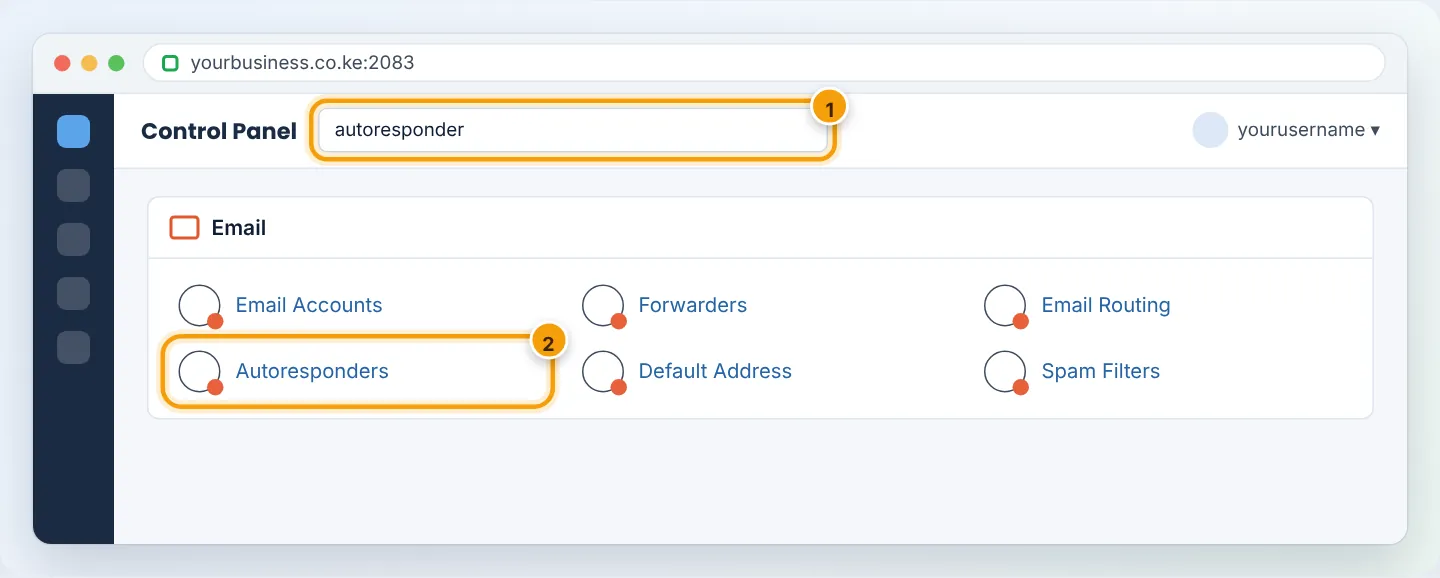
In cPanel, go to Email → Autoresponders. Choose the domain if you have several, then click Add Autoresponder.
Step 2: Fill in the form
| Field | What to enter |
|---|---|
| Character Set | utf-8 (default) |
| Interval | Hours before the same sender gets another auto-reply. 24 is sensible — it prevents flooding someone who emails you several times. |
The address that should auto-reply, e.g. info @ yourbusiness.co.ke |
|
| From | Your name or business name, e.g. Your Business Customer Care |
| Subject | e.g. Out of office: Re: %subject% — %subject% inserts their subject line |
| HTML message | Tick only if you paste HTML; otherwise leave unticked |
| Body | Your message (templates below). %from% inserts the sender’s name. |
| Start | Immediately or a custom date/time |
| Stop | Never or a custom date/time — set this for holidays! |
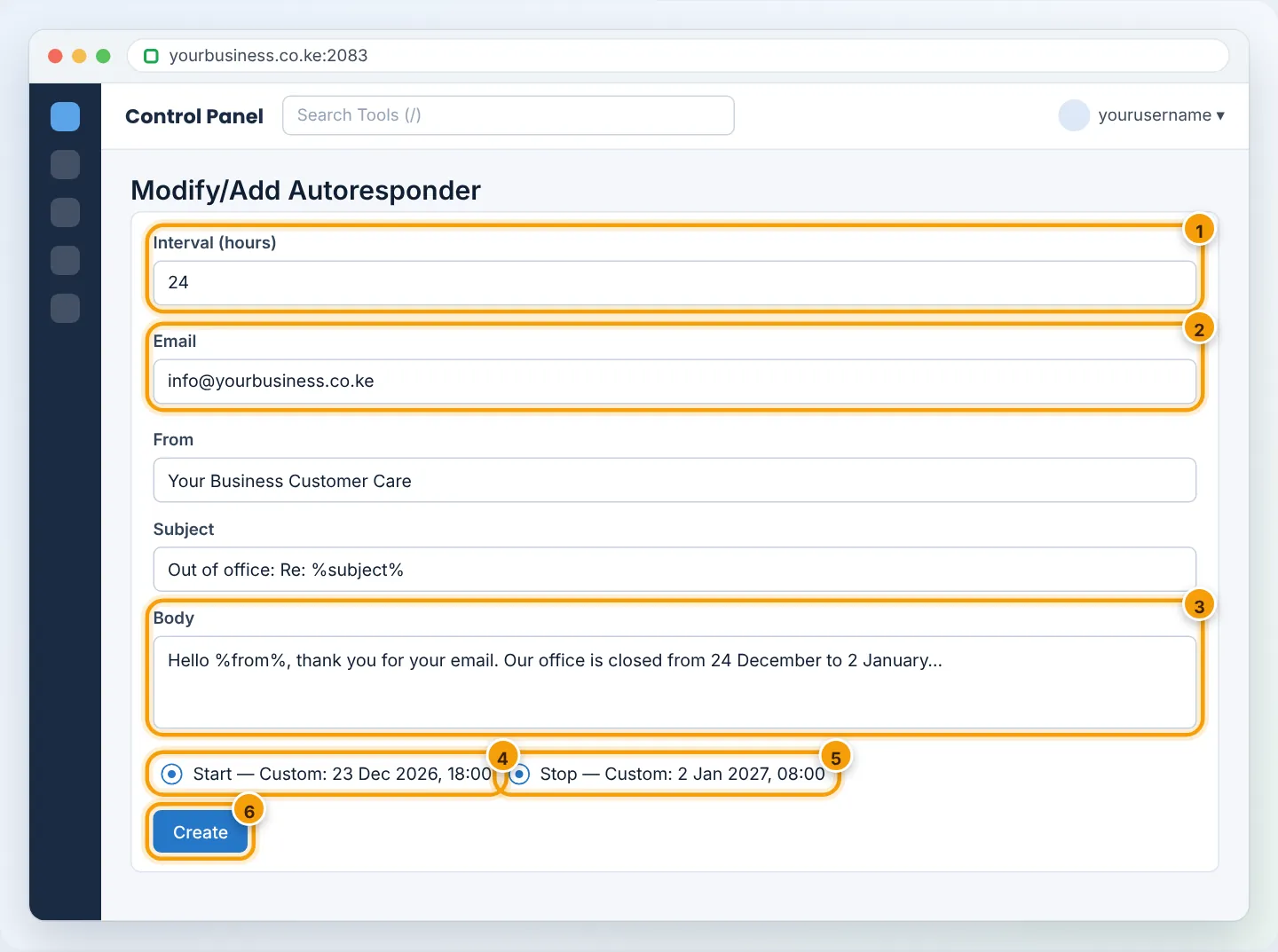
Click Create. The autoresponder appears in the Current Autoresponders list.
Step 3: Test it
From a different email account (e.g. your Gmail), send a message to the address. You should receive the auto-reply within a minute. (If you set a future start date, test after it begins.)
Templates you can copy
Holiday closure
Hello %from%,
Thank you for contacting Your Business. Our offices are closed from 24 December to 2 January for the holidays. We will reply to your email when we reopen on 2 January.
For urgent matters, WhatsApp us on +254 7XX XXX XXX.
Happy holidays!
After hours / weekend
Hello %from%,
Thanks for your message — it has reached us. Our team works Monday to Friday, 8:00am–5:00pm EAT, and we reply within one business day.
Urgent? Call or WhatsApp +254 7XX XXX XXX.
Enquiry acknowledgement (sales@)
Hello %from%,
Thank you for your enquiry about “%subject%”. A member of our sales team will respond within 2 working hours.
Meanwhile, see our price list at yourbusiness.co.ke/prices.
Staff on leave
Hello %from%,
I am on leave until Monday 13 January with limited access to email. For anything urgent please contact my colleague Peter Otieno at peter@yourbusiness.co.ke or 0712 345 678.
Turning it off
In Email → Autoresponders, find it under Current Autoresponders and click Delete. Or edit it and set Stop to now. If you set a stop date, it switches off by itself.
Alternative: set it from webmail
Mailbox users without cPanel access can do it themselves: log in to webmail → Settings → Out of Office / Vacation / Autoresponder (wording depends on the webmail app) — see Access webmail.
Troubleshooting
| Problem | Cause | Fix |
|---|---|---|
| No auto-reply received | Tested from the same address, or interval already used | Test from another account; wait for the interval or delete and recreate |
| Auto-replies to mailing lists/newsletters | Normal behaviour | Autoresponders skip most bulk mail automatically; set a 24-hour interval |
| Auto-reply went to spam | No SPF/DKIM, or very short message | Install SPF/DKIM via Email Deliverability; write a full sentence message |
| Still replying after holiday | No stop date | Delete it or set Stop |
Keep auto-replies short and useful — always include when you will reply and an alternative contact for urgent matters.
Figures are simplified illustrations. Your screen may look slightly different depending on your theme and the version of cPanel or the app you use.
Still need help?
Our Kenyan support team is on WhatsApp — real people, not bots. Mon–Sat, 8am–10pm EAT. Tickets are open 24/7.