
Knowledge Base · Billing & Payments
How to Request a Refund (30-Day Money-Back Guarantee)
New shared hosting customers can get their money back within 30 days if AutoHost isn't right for them. This guide explains exactly what qualifies, how to ask, and what happens next.
What qualifies for a refund
| Service | Refund? |
|---|---|
| New shared hosting — first-time customers | ✅ Within 30 days of the initial purchase |
| Email hosting — first purchase | ✅ Within 14 days |
| Renewals of any service | ❌ |
| Account upgrades | ❌ |
| Domain registration, transfer and renewal | ❌ (domains are registered with the registry immediately) |
| SSL certificate purchases | ❌ |
| VPS and dedicated servers | ❌ |
| Setup and migration fees | ❌ |
| Promotional or discounted services | ❌ |
| Accounts suspended or terminated for policy violations | ❌ |
The full rules are in our Refund Policy.
If your yearly hosting came with a free .co.ke domain (Business and up), the domain is registered in your name and stays yours. Its registration cost is non-refundable, so it may be deducted from a hosting refund.
Before you ask — can we fix it?
Many refund requests are for problems we can solve quickly — a slow site, email not working, or difficulty moving a website. WhatsApp +254 104 666 000 first; if we can’t make it right, we will process the refund without fuss.
Step 1: Back up anything you need
Once a refund is processed, the hosting account is cancelled. Download your files and databases first — see Backup Wizard — and copy any emails you want to keep.
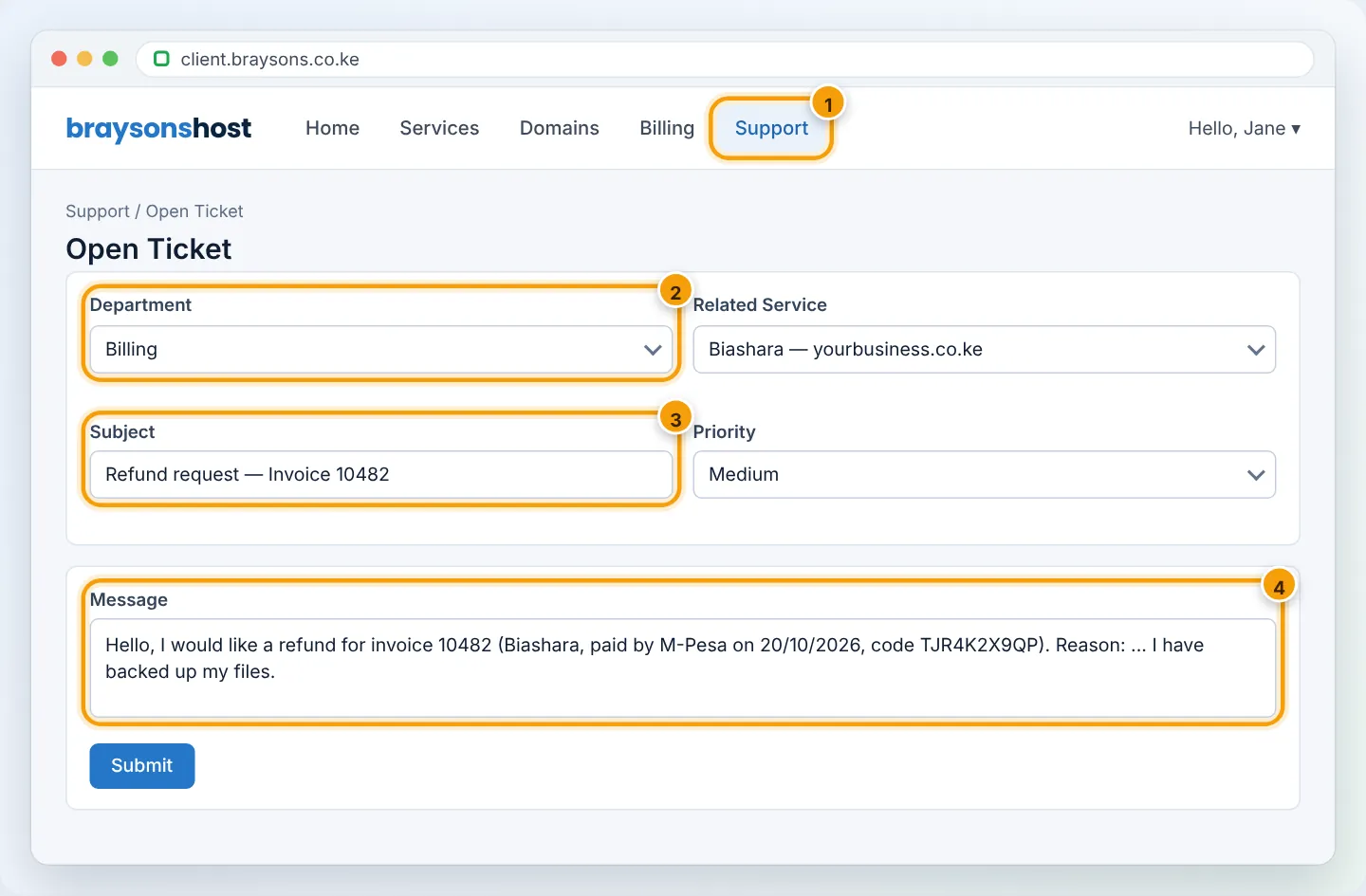
Step 2: Open a Billing ticket
Log in at portal.autohost.co.ke → Support → Open Ticket → choose the Billing department. Include:
- the invoice number you paid,
- the service/domain to refund,
- the reason (it helps us improve),
- how you paid — the refund goes back to the original payment method.
Step 3: What happens next

| Paid with | Typical time after approval |
|---|---|
| M-Pesa | 3–5 business days |
| Card | Up to 14 business days (depends on your bank) |
| Bank transfer | Up to 14 business days |
Frequently asked questions
Can I get a refund for the unused months of a yearly plan after 30 days?
No — only first purchases within the guarantee window qualify. You can cancel at the end of the period so it does not renew.
I’ve been a customer before. Do I qualify?
The guarantee is for first-time customers’ initial shared hosting purchase.
Can I downgrade instead?
Yes — often a smaller plan solves a cost concern. See Upgrade or downgrade.
Figures are simplified illustrations. Your screen may look slightly different depending on your theme and the version of cPanel or the app you use.
Still need help?
Our Kenyan support team is on WhatsApp — real people, not bots. Mon–Sat, 8am–10pm EAT. Tickets are open 24/7.