
Knowledge Base · Troubleshooting
How to Fix a Slow-Loading Website
Every extra second of loading costs visitors — especially on mobile data in Kenya. Most slow sites have the same few problems, and you can fix them without a developer. Measure first, fix the biggest problem, measure again.
AutoHost runs LiteSpeed web servers on NVMe storage, so the server is rarely the bottleneck. When a site is slow, it is usually what the page asks the browser to download, or the site’s own code.
Step 1: Measure (so you know what to fix)
- Go to pagespeed.web.dev, enter your homepage and click Analyze. Look at the Mobile tab.
- Note Largest Contentful Paint (LCP) — how long until the main content appears. Under 2.5 s is good.
- Scroll to Diagnostics — it lists the exact images, scripts and fonts slowing you down.
- Test 2–3 important pages (homepage, a product/service page, contact).

Step 2: Turn on caching
Caching saves a ready-made copy of each page so the server does not rebuild it for every visitor.
- WordPress: install LiteSpeed Cache (made for our servers) → LiteSpeed Cache → General → Enable: ON. Full setup in Speed up WordPress.
- Other PHP sites: ask us about LiteSpeed cache rules for your application.
- Static HTML sites: already fast; focus on images (Step 3).
Step 3: Shrink your images
Images are the #1 cause of slow sites. A phone photo can be 4–8 MB; on a web page it should be under 200 KB.
- Resize to the size it is shown (e.g. 1600 px wide for full-width banners, 800 px for content images).
- Compress & convert to WebP with squoosh.app (free) before uploading, or let LiteSpeed Cache’s Image Optimization do it automatically in WordPress.
- Lazy-load images below the fold (LiteSpeed Cache → Page Optimization → Media → Lazy Load Images).
| Image | Target size |
|---|---|
| Hero / banner | under 250 KB |
| Content / product photo | under 150 KB |
| Logos and icons | under 30 KB (SVG where possible) |
Step 4: Remove what you do not need
- Plugins: deactivate and delete anything unused. Replace heavy “all-in-one” plugins with lighter ones.
- Sliders and animations on the homepage often add 1–2 MB of scripts — a single strong image is faster and converts better.
- Third-party scripts: chat widgets, multiple analytics/pixel tags, social feeds and embedded maps each add requests. Keep only what you use; load maps and videos only when clicked.
- Web fonts: use one or two font families, and few weights.
Step 5: Use a current PHP version
PHP 8.2/8.3 runs WordPress much faster than PHP 7.x. Change it in Software → Select PHP Version — see Change PHP version. Enable the opcache extension.
Step 6: Check resource limits
In cPanel, open Metrics → Resource Usage. If you see faults (CPU, memory or entry processes hitting the limit), visitors may get slow pages or “508 Resource Limit Reached”.
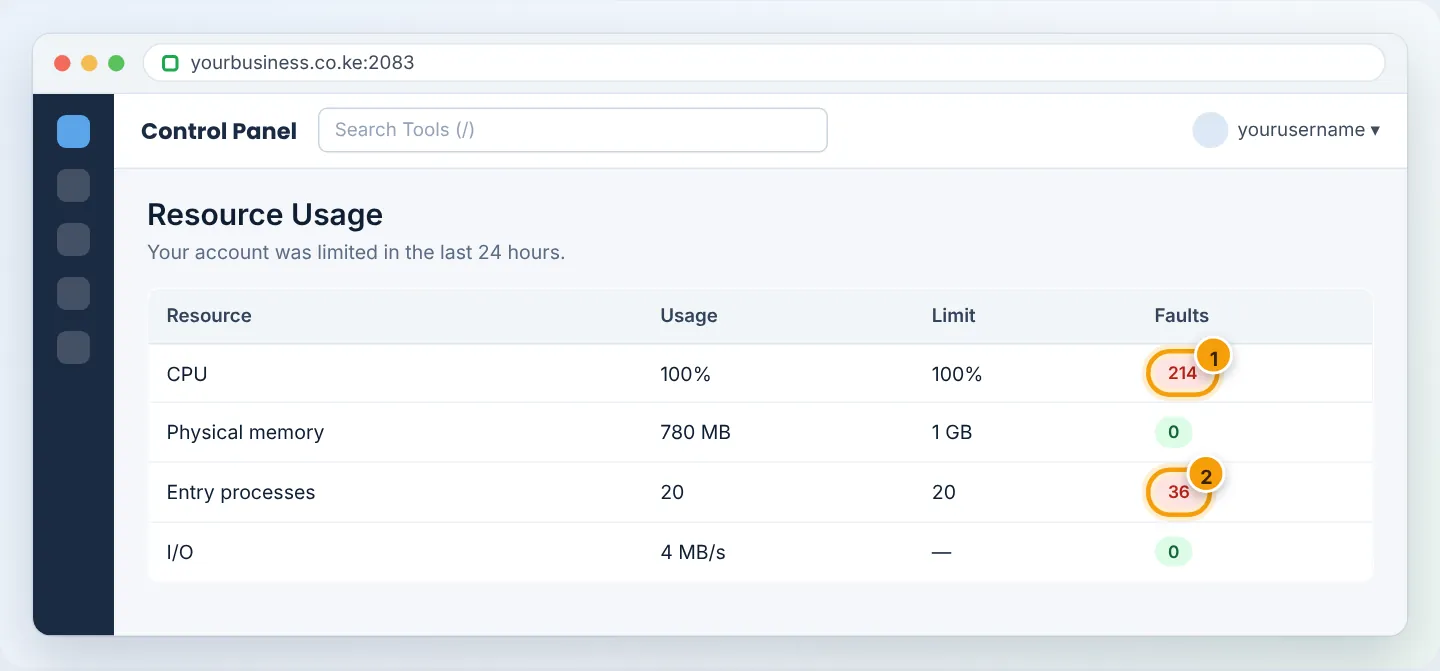
Common causes: no caching, bots crawling aggressively, a slow plugin, or a cron job running too often. Fix those first; if your traffic has genuinely grown, upgrade your plan.
Step 7: Clean up the database (WordPress)
Old revisions, spam comments and expired transients bloat the database. LiteSpeed Cache → Database → Manage → Clean All, or use WP-Optimize. Back up first.
Step 8: Consider a CDN
A CDN serves your images and files from locations near each visitor. Your site is already hosted in Kenya, which is ideal for local visitors; a CDN (e.g. QUIC.cloud, which pairs with LiteSpeed Cache, or Cloudflare) mostly helps international visitors. If you use Cloudflare, set SSL to Full (strict).
Step 9: Measure again
Re-run PageSpeed Insights. Fix the next biggest opportunity. Small, steady improvements add up.
Troubleshooting summary
| Symptom | Likely cause | Fix |
|---|---|---|
| Slow first load, fast afterwards | No page caching | LiteSpeed Cache |
| Slow everywhere, big page size | Images | Resize + WebP + lazy load |
| Slow admin area only | Heavy plugins, old PHP | Remove plugins; PHP 8.2+ |
| Slow at busy times, 508 errors | Resource limits | Caching; block bad bots; upgrade |
| Slow only for overseas visitors | Distance | CDN |
Want a second opinion? Send us your PageSpeed link on WhatsApp — our team will point out the biggest wins.
Figures are simplified illustrations. Your screen may look slightly different depending on your theme and the version of cPanel or the app you use.
Still need help?
Our Kenyan support team is on WhatsApp — real people, not bots. Mon–Sat, 8am–10pm EAT. Tickets are open 24/7.