
Knowledge Base · Domain Management
How to Protect Your Personal Details in WHOIS (Domain Privacy)
When you register a domain, the registry keeps the owner's contact details. Some of that can be looked up publicly in WHOIS — which is why new domain owners often get spam, fake “domain expiry” invoices and sales calls. Here is what is visible and how to reduce it.
What WHOIS shows
| Domain type | Typical public details | Can privacy be added? |
|---|---|---|
| .co.ke and other .ke | Domain status, registrar, dates, nameservers. Registrant name may show; KeNIC limits personal contact details in public output | Not usually — KeNIC already restricts personal data |
| .com, .net, .org and most global domains | Since 2018 most registrars redact personal data, but some details (organisation, country, state) may show | Yes — ID Protection add-on where offered |
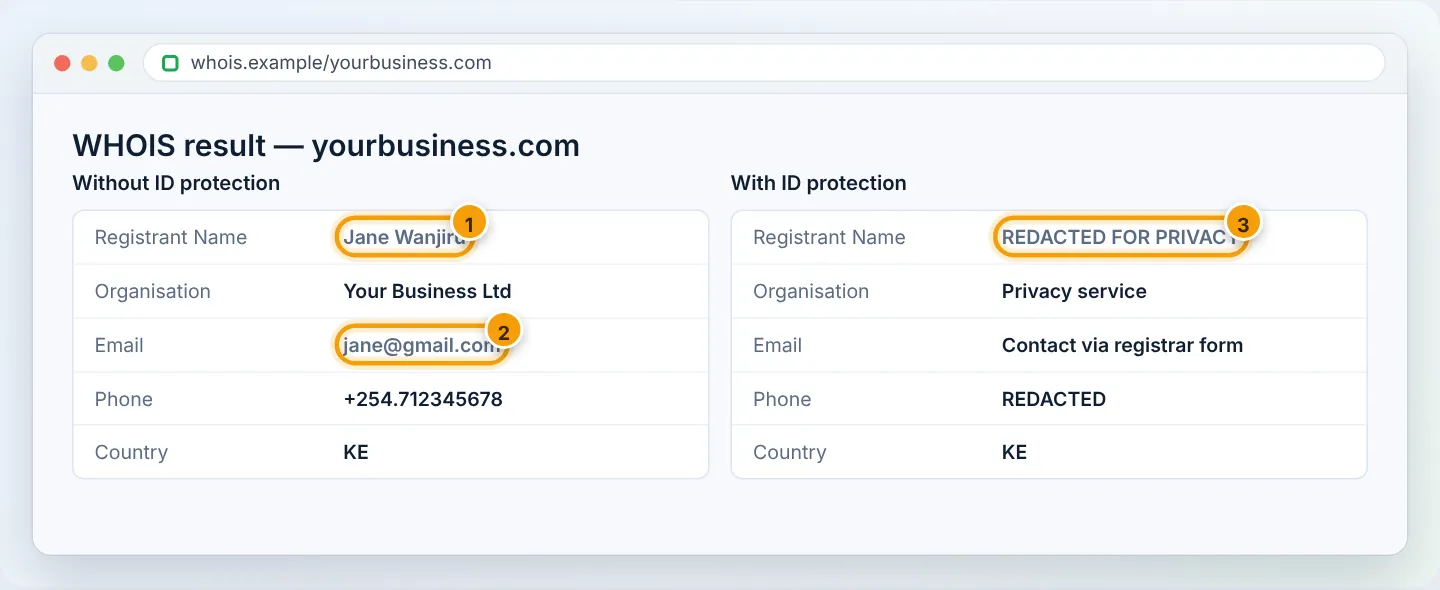
Why bother?
- Fewer spam emails and fake renewal invoices (“your domain is about to expire — pay here”) from companies that are not your registrar.
- Fewer sales calls from web designers and SEO agencies.
- Less exposure of personal phone numbers and home addresses.
Only pay renewal invoices from AutoHost (portal.autohost.co.ke or emails from @autohost.co.ke). Letters and emails from “domain registry services” offering SEO listings or renewals are scams or overpriced resellers.
Step 1: Check your current WHOIS
- For .ke domains: search at whois.kenic.or.ke.
- For .com and others: search at lookup.icann.org.
Note which details are visible.
Step 2: Turn on ID Protection (where available)
- Log in to portal.autohost.co.ke → Domains → My Domains.
- Click Manage next to the domain.
- Open Addons (or Management Tools → Addons) and look for ID Protection.
- Click Buy Now / Enable and complete checkout if there is a fee.
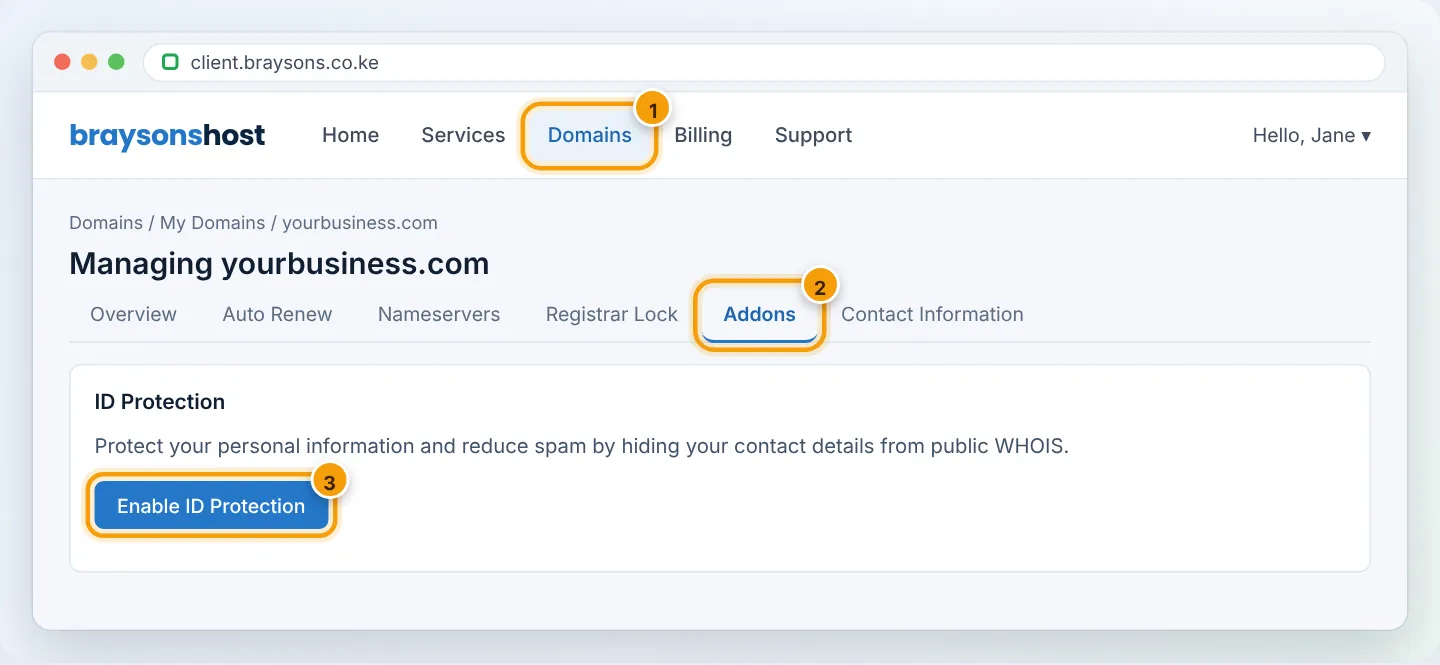
If the option does not appear, the extension (for example most .ke domains) does not support it — KeNIC’s own data rules apply instead.
Step 3: Keep your details accurate anyway
Privacy hides details from the public; it does not replace them. The registry still needs correct registrant information, and approval emails for transfers and renewals go to the registrant email. Inaccurate details can lead to suspension.
Update them in Domains → My Domains → Manage → Contact Information.
Practical alternatives for .ke domains
- Register the domain to your company rather than a personal name.
- Use a role email like
domains@yourbusiness.co.ke(or a dedicated Gmail) as the registrant email rather than your personal inbox. - Use your business Rovies Business Centre – Ukunda / Diani as the postal address.
Troubleshooting
| Problem | Cause | Fix |
|---|---|---|
| WHOIS still shows my details after enabling | Public WHOIS caches update slowly | Check again after 24–48 hours |
| No ID Protection option | Extension does not support it | Use company details and role email |
| Can’t receive transfer approval emails | Privacy forwarding or old email | Make sure the registrant email underneath is current |
Frequently asked questions
Is privacy allowed for business websites?
Yes. Some customers like seeing a company name in WHOIS for trust — registering in your company name gives that without exposing personal details.
Does privacy affect SEO?
No.
Figures are simplified illustrations. Your screen may look slightly different depending on your theme and the version of cPanel or the app you use.
Still need help?
Our Kenyan support team is on WhatsApp — real people, not bots. Mon–Sat, 8am–10pm EAT. Tickets are open 24/7.